
The Ultimate Way to Manage Guest Posts on WordPress: Introducing GuestDock
If you run a successful WordPress blog or content hub, you already know that accepting guest posts is one of the best ways to scale your content, build industry relationships, and drive fresh traffic.
But let’s be honest: the logistics of managing guest contributors can be a nightmare. Between endless email chains, back-and-forth Google Docs, worrying about what users can see in your WordPress backend, and stressing over malicious file uploads—scaling your guest posting strategy often feels like more trouble than it’s worth.
Enter GuestDock.
GuestDock is the industry-standard WordPress plugin designed to completely revolutionize how you handle external contributors. Let’s dive into why GuestDock is the ultimate solution for your WordPress editorial workflow and how it can save you hours of admin time while keeping your site 100% secure.
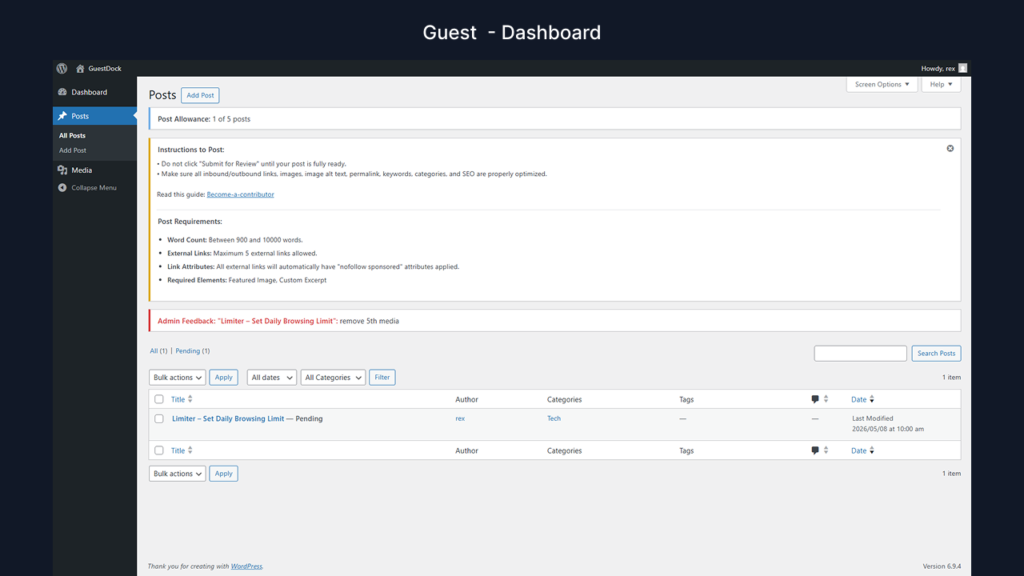
Caption: GuestDock’s clean, intuitive, and secure guest dashboard.
The Problem: Why Standard WordPress User Roles Fall Short
By default, WordPress offers a “Contributor” role. However, handing out Contributor access to strangers comes with massive risks and headaches:
- Lack of Privacy: Contributors can see other people’s drafts, sensitive site settings, and your entire media library.
- Quality Control: They can submit posts missing vital elements (like a featured image or a minimum word count).
- Ghost Accounts: Old, inactive user accounts pile up, creating a massive security vulnerability over time.
- Spammy Links: You have to manually comb through their posts to ensure they aren’t stuffing it with spammy, do-follow links that hurt your SEO.
GuestDock fixes all of this.
What is GuestDock? (And Why You Need It)
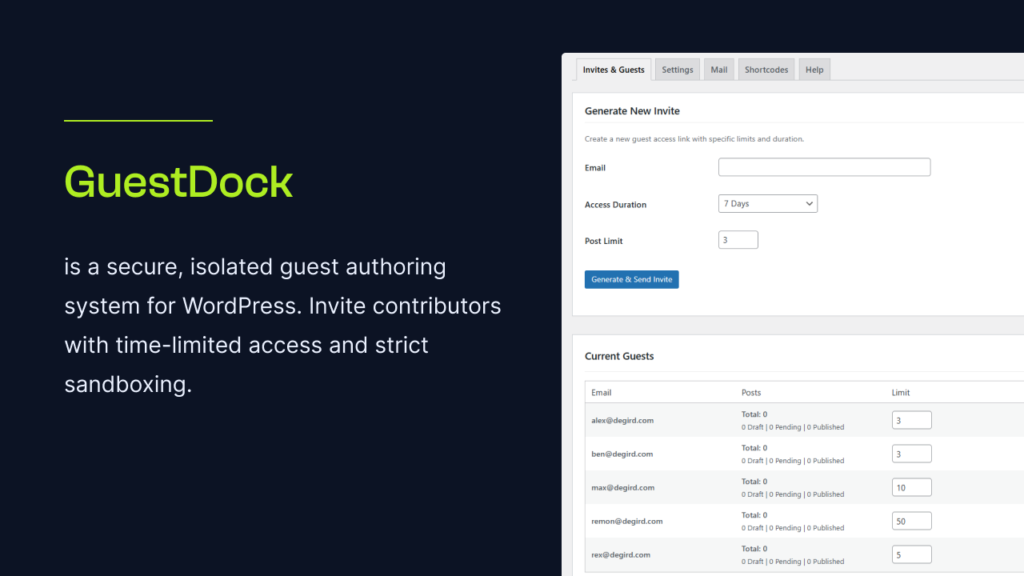
GuestDock is a secure, fully-isolated guest authoring sandbox for WordPress. It allows you to invite guest authors with time-limited access and strictly defined quotas, ensuring they only have access to exactly what they need—and nothing else.
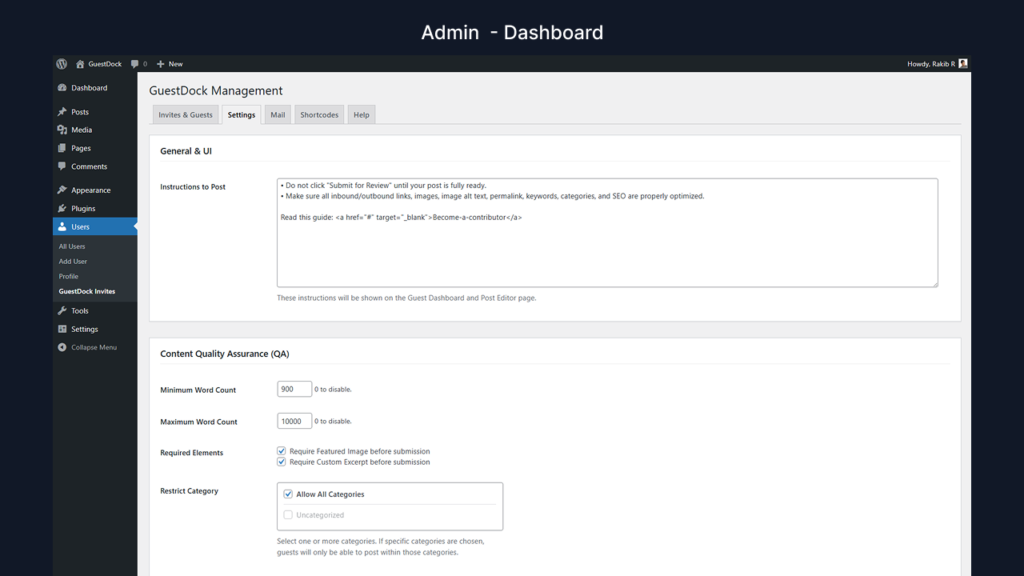
Caption: An overview of the GuestDock Admin settings and QA rules.
Let’s look at the features that make GuestDock the best guest posting plugin for WordPress:
1. Bulletproof Sandbox Isolation 🛡️
Security is our top priority. When a guest logs into your WordPress site via GuestDock, they are placed in a restricted “Sandbox”.
- They can only see their own posts.
- They can only see and manage the media files they upload.
- All other posts, pages, and media files are completely invisible to them.
2. Time-Limited Access & Quotas ⏳
No more ghost accounts! With GuestDock, you can set precise expiration dates for your guests. For example, give a guest 7 days to write their post. Once the time is up, they are automatically locked out. You can also set Post Limits, restricting a user to submitting exactly 1, 2, or 3 posts before their access is revoked.
3. Automated Content QA Enforcement ✍️
Tired of rejecting posts because they are too short or missing a featured image? GuestDock does the QA for you. You can set strict rules that disable the “Submit” button until the guest meets your criteria:
- Minimum and maximum word counts.
- Required Featured Image and Excerpt.
- Limitations on the number of external links allowed.
Caption: GuestDock’s dynamic editor warnings when QA rules are not met.
4. Advanced Editorial Workflow 🔄
GuestDock brings professional editorial tools directly into the WordPress editor. When a guest submits a post, you can review it. If it needs work, use the Admin Feedback box at the bottom of the editor to leave notes and return it to “Draft.” The guest will be instantly notified and can see your feedback right inside their editor.
5. Automatic SEO Protection 🚀
Don’t let guest bloggers hijack your domain authority. GuestDock automatically injects rel=”nofollow sponsored” attributes to all external links in guest posts, protecting your SEO profile from spam penalties without you having to lift a finger.
6. Media Security & Gutenberg Restrictions 🖼️
Guest uploads are heavily scrutinized. GuestDock enforces strict MIME type validations and file size limits (e.g., max 2MB) to prevent server abuse. Furthermore, it restricts guests to using only safe Gutenberg blocks (like Paragraphs and Images), preventing malicious layout-breaking code blocks. And as an added layer of security, GuestDock automatically secures REST API endpoints and disables XML-RPC access for guest accounts.
Who is GuestDock Built For?
GuestDock is flexible enough to fit perfectly into almost any WordPress-based content strategy:
- Multi-Author Niche Blogs: Safely scale your content output by inviting experts in your niche to write for you without compromising site security.
- News Sites & Magazines: Manage a revolving door of freelance contributors with strict time-limits and quotas.
- Corporate Blogs: Allow guest industry leaders to submit thought-leadership pieces directly into your CMS, rather than juggling Word documents via email.
- SEO Agencies: Automate your inbound guest posting pipelines. Use the shortcode on a “Write for Us” page to let prospects apply, then invite them with a single click.
Caption: The frontend guest request form generated by GuestDock’s shortcode.
How to Get Started with GuestDock
Setting up your secure guest authoring pipeline is incredibly simple:
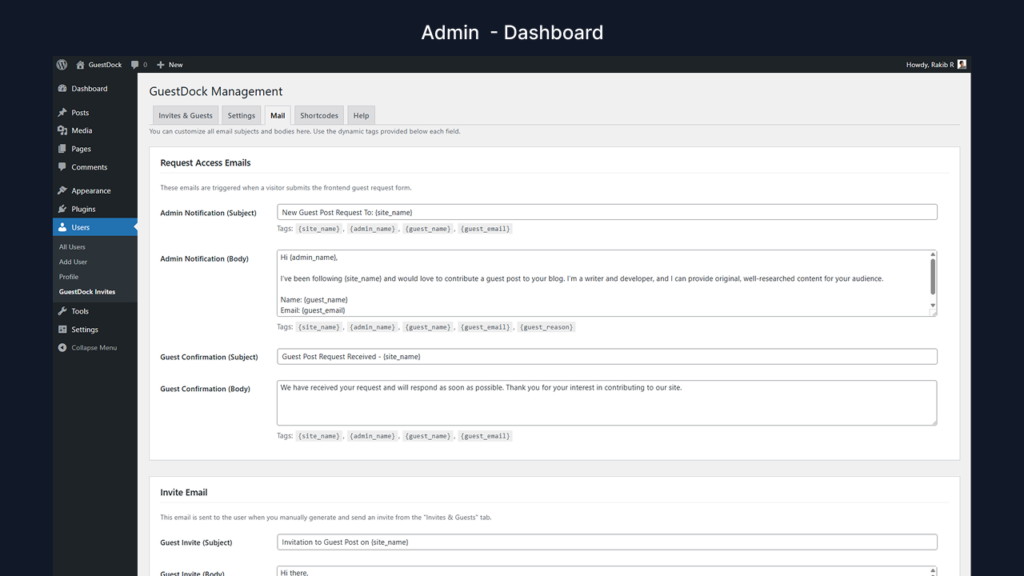
- Install and Configure: Install the GuestDock plugin on your WordPress site. Navigate to the GuestDock settings to establish your QA rules, set media file limits, and customize your automated email templates.
- Invite a Guest: Go to Invites & Guests. Enter your prospect’s email, set an expiration date (e.g., 7 days), and choose a post limit. Click “Generate Invite.”
- Guest Writes in the Sandbox: The guest logs in, sees only your custom instructions and their own blank canvas, and begins writing using the safe blocks provided. They must hit your word count and image requirements before submitting.
- Review & Publish: You receive an email alert. Review their submission, leave inline feedback if necessary, or simply click Publish!
- Smart Cleanup: When the guest’s time expires, they are locked out. If you ever delete their user account, GuestDock automatically reassigns their posts to an administrator to prevent content loss.
Caption: Managing guest invites and expirations from the WordPress dashboard.
Ready to Transform Your Editorial Workflow?
Managing guest posts doesn’t have to be a risky, time-consuming chore. With GuestDock, you get a powerful, automated, and hyper-secure environment that respects your time and protects your WordPress site.
Stop emailing Word documents back and forth. Start scaling your content securely.