
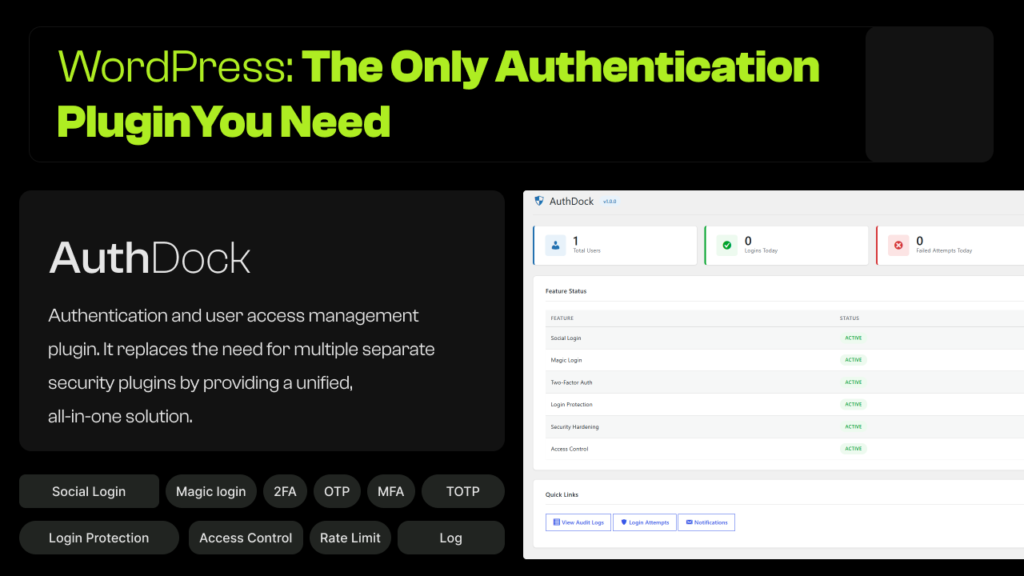
Stop juggling multiple WordPress security plugins. AuthDock brings social login, two-factor authentication, brute force protection, magic link login, session management, audit logging, and security hardening into a single, lightweight package.
WordPress Login Security Shouldn’t Require 7 Plugins
If you’re running a WordPress site in 2026, you’ve probably installed at least a few of these: a social login plugin, a two-factor authentication plugin, a brute force protection plugin, maybe a login limiter, an audit log tool, and something to hide your login page. Each one adds its own settings page, its own database tables, its own JavaScript and CSS files, and its own update cycle.
That’s a lot of moving parts — and every one of them is a potential conflict, a performance hit, or a security gap waiting to happen.
AuthDock was built by Degird to solve this exact problem. It’s a single, professional-grade WordPress authentication plugin that handles everything from social login to session management — with a WordPress-native UI that feels like it belongs in core.
What AuthDock Actually Does
AuthDock is organized into 10 modular features. Each one can be enabled or disabled independently, so you only activate what you need.
🔑 Social Login — One-Click Authentication for Your Users
Forgotten passwords are the number one reason users abandon login forms. AuthDock’s social login module lets visitors sign in with a single click using accounts they already have:
- Google — OAuth 2.0 integration with Google Cloud Console
- Facebook — Authentication via the Facebook Graph API
- GitHub — Perfect for developer-focused sites and open source communities
- X (Twitter) — OAuth 2.0 with PKCE (S256) for state-of-the-art security
But AuthDock doesn’t stop at basic social sign-in. You get granular control over every detail:
- Button appearance — Choose between icon + text, icon-only, or text-only styles, and display them vertically or horizontally
- Button ordering — Drag and drop to prioritize the providers your audience uses most
- Default role assignment — Automatically assign new social users to any WordPress role (Subscriber, Customer, Member, etc.)
- Domain restriction — Limit social login to specific email domains like company.com or university.edu — essential for corporate intranets and educational institutions
- Avatar integration — Automatically pull profile pictures from social accounts
- Account linking — Users can connect and disconnect social accounts from their WordPress profile page at any time
For developers, AuthDock provides two filters — authdock_allow_social_account_linking and authdock_allow_social_registration — giving you programmatic control over who can link accounts and who can register.
You can also place social login buttons anywhere on your site using the
shortcode with customizable layout and style attributes.✉️ Magic Link Login — Passwordless Authentication Done Right
Passwords are a liability. They get reused, leaked in data breaches, forgotten, and phished. Magic link login eliminates the password entirely — users enter their email, receive a one-time link, click it, and they’re in.
AuthDock’s magic link implementation is built with security as the priority:
- Configurable link expiry — Set exactly how long each link stays valid (default: 10 minutes)
- Per-email rate limiting — Prevent abuse by limiting requests per email per hour (default: 5/hour)
- Role-based access — Restrict magic login to specific user roles
- Force magic-only mode — Hide the standard WordPress password form entirely and show only the magic link option
- Custom email templates — Personalize the subject line and body using merge tags: {user_name}, {magic_link}, {expiry_time}, {site_name}, {ip_address}
- One-time use tokens — Each link is cryptographically random and self-destructs after a single use
- Automatic invalidation — If a user changes their password, all outstanding magic links are immediately invalidated
- Anti-enumeration — The same success message is shown whether the email exists or not, preventing attackers from discovering valid accounts
Use the
🔐 Two-Factor Authentication — Protect Every Login With a Second Layer
Two-factor authentication (2FA) is no longer optional — it’s the single most effective way to prevent unauthorized access even when passwords are compromised. AuthDock supports two methods:
TOTP (Authenticator App)
Users scan a QR code with Google Authenticator, Authy, Microsoft Authenticator, 1Password, Bitwarden, or any TOTP-compatible app. AuthDock implements RFC 6238 with:
- AES-256-CBC encryption — TOTP secrets are encrypted at rest in the database, not stored as plaintext
- Replay protection — Each code can only be used once per 30-second window, preventing replay attacks
- Clock drift tolerance — Accepts codes from ±1 time step to handle minor clock differences between server and device
Email Verification Code
A 6-digit numeric code is sent to the user’s email address. Perfect for users who don’t have an authenticator app installed.
Enforcement and Flexibility
- Per-role enforcement — Force specific roles (e.g., Administrator, Editor) to set up 2FA
- Grace period — Give new users a configurable number of days (default: 3) to set up 2FA before they’re locked out of the admin
- Trusted devices — Users can mark a device as trusted, skipping the 2FA challenge for a configurable number of days (default: 30)
- Backup recovery codes — 10 one-time-use codes are generated during setup. If a user loses their authenticator device, these codes provide emergency access
- Brute-force protection — After 5 failed verification attempts, the session is destroyed and the user must start over
Administrators can view and disable 2FA for any user directly from the WordPress user profile page.
🛡️ Brute Force Protection — Intelligent Lockouts That Escalate Automatically
Every WordPress site is a target for automated brute-force attacks. AuthDock’s login limiter stops them with configurable rules that get progressively stricter:
- Max attempts threshold — Set how many failed logins trigger a lockout (default: 5)
- Progressive escalation — Lockout durations automatically increase: 15 minutes → 1 hour → 24 hours for repeat offenders
- Auto-blacklist — After a configurable number of lockouts, the IP is permanently banned
- IP whitelist — Your own IP, your team’s office IPs, or your VPN exit node can bypass all limits. Supports exact IPs, CIDR ranges (192.168.1.0/24), and wildcards (10.0.0.*)
- IP blacklist — Permanently block known bad actors using the same flexible format
- Trusted proxy support — If you’re behind Cloudflare, AWS ALB, or nginx, specify your proxy IPs so AuthDock reads the real client IP from X-Forwarded-For headers
- XML-RPC integration — Locked-out IPs are also blocked from XML-RPC authentication, closing a common brute-force vector
- Login page warnings — Users see how many attempts they have remaining and a countdown timer during active lockouts
- Admin email alerts — Get notified immediately when an IP gets locked out
🔄 Dynamic Login & Logout Redirects — Send Users Where They Belong
WordPress sends everyone to /wp-admin after login and to wp-login.php?loggedout=true after logout. That’s fine for administrators, but terrible for subscribers, customers, and members.
AuthDock lets you set custom redirect URLs for every WordPress role:
- Login redirects — Editors go to /editorial-dashboard, subscribers to /members-area, customers to /my-account
- Logout redirects — Send users to a custom “goodbye” page, the homepage, or a re-engagement landing page
- First-login redirect — Brand new users see a welcome page, onboarding wizard, or profile setup screen on their very first login — then never again
- Relative and absolute URLs — Use simple paths like /dashboard or full URLs like https://example.com/welcome
- Open redirect prevention — All redirects are validated through wp_safe_redirect() and wp_validate_redirect() to prevent attackers from weaponizing your login flow
📋 Audit Logging — A Complete Record of Every Authentication Event
When something goes wrong — a compromised account, an unauthorized login, a suspicious pattern — you need answers. AuthDock’s audit log gives you a searchable, filterable, exportable record of every authentication event:
What gets logged:
Login successes, login failures, logouts, password resets, user registrations, profile updates (email and role changes), social logins, social account linking and unlinking, magic link requests and usage, 2FA enable/disable events, session terminations, access blocked events, and IP lockouts.
Each entry records:
User ID, event type, IP address, user agent string, JSON context data (with event-specific details), and a precise timestamp.
Powerful tools for investigation:
- Filter by event type, date range, user ID, or IP address
- Full-text search across event types, IPs, and context data
- Export to CSV (with OWASP formula injection protection) or JSON
- One-click purge to clear all historical data
- Configurable retention: 30, 60, 90, 180, 365 days, or unlimited
Logs are stored in a dedicated authdock_audit_logs database table with proper indexes for fast queries. A daily WP-Cron job cleans up expired entries in batches of 1,000 to avoid database locks.
🏰 Security Hardening — Close WordPress’s Most Exploited Gaps
AuthDock includes a suite of security hardening features that address the most commonly exploited WordPress vulnerabilities:
Custom Login URL
Replace wp-login.php with a custom URL slug (e.g., /my-secure-login). Direct access to the default login page returns a 404 error or redirects to your homepage. A recovery key parameter lets you regain access in emergencies.
XML-RPC Control
Completely disable XML-RPC to block remote brute-force attacks, or partially disable it — removing only authentication methods while keeping pingbacks functional for SEO.
REST API Restriction
Block the WordPress REST API for unauthenticated visitors while whitelisting specific namespaces (WooCommerce, Jetpack, etc.) that need public access.
User Enumeration Prevention
Block ?author=N enumeration queries, restrict the /wp-json/wp/v2/users endpoint to logged-in users, and replace specific login error messages (“invalid username” / “wrong password”) with a generic “invalid username or password” message.
Password Strength Enforcement
Require strong passwords with configurable rules: minimum length, uppercase letters, lowercase letters, numbers, and special characters — each individually toggleable and enforceable per role.
Security HTTP Headers
Enable six essential security headers with one-click toggles:
| Header | What It Does |
|---|---|
| X-Content-Type-Options | Prevents MIME-type sniffing attacks |
| X-Frame-Options | Blocks clickjacking via iframe embedding |
| X-XSS-Protection | Legacy XSS filter for older browsers |
| Referrer-Policy | Controls referrer data sent with requests |
| Strict-Transport-Security | Enforces HTTPS for all connections |
| Permissions-Policy | Restricts camera, microphone, and geolocation APIs |
📧 Email Notifications — Real-Time Alerts for Critical Security Events
AuthDock sends instant email alerts when critical security events happen — to administrators and users alike.
Admin alerts include:
- Multiple failed login attempts from the same IP (every N failures)
- IP lockout events
- Administrator account logins
- New user registrations
- Users promoted to the Administrator role
- Administrator password changes
- Two-factor authentication being disabled
- Logins from previously unseen IP addresses
User self-notifications include:
- Password changed
- Email address changed (sent to the old email for security)
- 2FA enabled or disabled
- Social account connected
- Login from a new device or IP
- Account locked due to failed attempts
All notifications include a configurable throttle period (default: 60 minutes) to prevent inbox flooding, custom recipient emails, and a test email button to verify your mail configuration.
🚪 wp-admin Access Control — Lock Down Your Dashboard
Not every user needs access to /wp-admin. AuthDock lets you restrict dashboard access by role, by IP, or both:
- Blocked roles — Choose which roles can’t access wp-admin (e.g., Subscriber, Customer)
- IP restriction mode — Only allow specific IP addresses and CIDR ranges to reach the dashboard
- Admin bar hiding — Remove the WordPress admin bar from the frontend for blocked roles
- Redirect action — When access is denied, redirect to the homepage, a custom URL, or show a 403 Forbidden page
- Emergency bypass key — A secret query parameter (?authdock_bypass=YOUR_KEY) to regain access if you get locked out
- Smart exceptions — AJAX requests, WP-Cron, and admin-post.php are always allowed through
- Administrator immunity — Administrators can never be blocked, regardless of settings
⏱️ Session Management — Control Who’s Logged In and For How Long
AuthDock gives administrators full control over user sessions:
- Concurrent session limit — Set how many simultaneous logins a user can have. When the limit is exceeded, the oldest session is destroyed automatically
- Idle session timeout — Automatically log out users after a configurable period of inactivity
- Per-role session duration — Set different session cookie lifetimes for each WordPress role
- Admin session viewer — View all active sessions via the REST API, including user details and last activity timestamps
- Remote termination — Destroy all sessions for any user with a single API call
- Throttled tracking — Last-activity timestamps update at most once per 5 minutes to minimize database writes
Performance: Built for Speed, Not Bloat
AuthDock is engineered to be lightweight:
- Conditional asset loading — CSS and JS files load only on pages where they’re used
- Indexed database tables — Custom tables use proper indexes for fast lookups
- Transient-based tracking — Brute force tracking uses WordPress transients, adding zero database queries per login attempt
- WP-Cron maintenance — Audit log cleanup runs in the background via non-blocking cron
- REST API architecture — All admin data operations use the modern authdock/v1 REST API with 15+ endpoints
- Zero external frameworks — No Bootstrap, no Tailwind, no jQuery UI loaded in the admin. Just clean, WordPress-native code
Developer-Friendly by Design
AuthDock follows WordPress development best practices:
- Hook-based architecture — All functionality registers through add_action() and add_filter() via a centralized Loader class
- Custom capabilities — 5 granular capabilities (authdock_manage_settings, authdock_view_audit_logs, authdock_export_audit_logs, authdock_manage_sessions, authdock_manage_lockouts) for fine-grained permission control
- Developer filters — Hook into social login, registration, and account linking decisions
- REST API namespace — Full authdock/v1 REST API with public, authenticated, and admin endpoints
- Clean lifecycle — Proper activation (database tables, defaults, capabilities, cron), deactivation (cron cleanup, settings preserved), and uninstall (complete data removal)
- Full i18n — Every user-facing string uses WordPress internationalization functions with the authdock text domain
Shortcodes for Flexible Placement
Drop authentication forms anywhere on your site:l
## Who Is AuthDock For?
**Membership sites** — Social login reduces friction; 2FA protects premium content; session management prevents account sharing.
**WooCommerce stores** — Social login on checkout reduces cart abandonment; role-based redirects send customers to `/my-account`; brute force protection defends customer data.
**Multi-author blogs** — Audit logging tracks who did what; 2FA enforcement for editors and administrators; custom login URL hides the attack surface.
**Corporate intranets** — Domain restriction limits social login to company emails; IP-based access control restricts wp-admin to office networks; session timeouts enforce security policies.
**Client sites** — One plugin instead of seven means fewer conflicts, fewer updates, and easier handoff. The WordPress-native UI means clients can manage settings without a tutorial.
## Getting Started in 3 Minutes
1. **Install** — From WordPress admin: **Plugins → Add New → Search “AuthDock” → Install → Activate**
2. **Configure** — Go to **AuthDock** in the admin sidebar. Each feature has its own tab with a master toggle
3. **Enable what you need** — Social login? Flip the switch and paste your OAuth credentials. 2FA? One toggle. Brute force protection? Already enabled by default
AuthDock ships with sensible defaults — brute force protection and audit logging are enabled out of the box, so your site gets immediate protection with zero configuration.
## Frequently Asked Questions
**Does it work with WooCommerce?**
Yes. Social login buttons display on WooCommerce login and checkout pages. Role-based redirects work with WooCommerce customer roles.
**Is it multisite compatible?**
Yes. Each subsite has independent settings and its own audit log table.
**What authenticator apps work with the 2FA?**
Any TOTP-compatible app: Google Authenticator, Authy, Microsoft Authenticator, 1Password, Bitwarden, FreeOTP, and more.
**What if I lock myself out with the custom login URL?**
Use the recovery key parameter: `?authdock_recover=YOUR_KEY`. Set the key in AuthDock → Security.
**Does brute force protection work behind Cloudflare?**
Yes. Configure your proxy IPs in the login limiter settings, and AuthDock reads the real client IP from `X-Forwarded-For` headers.
**Will it slow down my site?**
No. Conditional asset loading, transient-based tracking, and zero external frameworks mean AuthDock has negligible performance impact.
## Replace Your Plugin Stack Today
AuthDock is free, open source (GPL-2.0+), fully WordPress.org compliant, and contains zero tracking code, no encoded scripts, and no forced upsells.
**One plugin. Ten features. Zero bloat.**
[Download AuthDock from WordPress.org →](https://wordpress.org/plugins/authdock/)